
1. Verify symbol, timeframe, and timestamp
Confirm that you are looking at the intended market and analytical horizon, then compare the event time and displayed price with current conditions.
Article
A practical guide to the action layer of Pattern Horizon notifications: symbol, timeframe, pattern, action, status, direction, price, key levels, quality, probability, targets, invalidation, and what to watch next.
Signal field guide · Part 1
A Pattern Horizon notification is a structured snapshot of a market setup—not a one-line instruction to buy or sell. This first part explains the fields you should read immediately, the fields you should never interpret in isolation, and a repeatable order for reviewing a message before opening the full analysis.
Start with the right expectation
Discord and Telegram help Pattern Horizon deliver information quickly, but speed does not change what the information represents. Each message summarizes a detection or a meaningful lifecycle change recorded by the platform. It does not open a position, calculate a suitable position size for you, or know your account balance, objectives, experience, spread, liquidity, or tolerance for loss. Treat the notification as an invitation to review a setup, not as permission to skip your own process.
The same setup may generate more than one message as its state changes. A pattern can begin while it is still forming, move to AWAITING_CONFIRMATION, become CONFIRMED, reach a target, fail, expire, or enter another supported state. A support or resistance zone can move from APPROACHING to TOUCHING, IN_ZONE, PIERCED, REJECTED, or BROKEN. This means the newest message should be read together with the setup identity and recent history. An earlier bullish or bearish interpretation may no longer describe the current state.
Telegram and Discord are delivery channels. The website remains the fuller review surface because it can show the current signal, chart, event timeline, and structured technical context together. Third-party messaging services and networks may also introduce delay. Always compare the notification price and timestamp with the live market before forming a decision.
Line 1
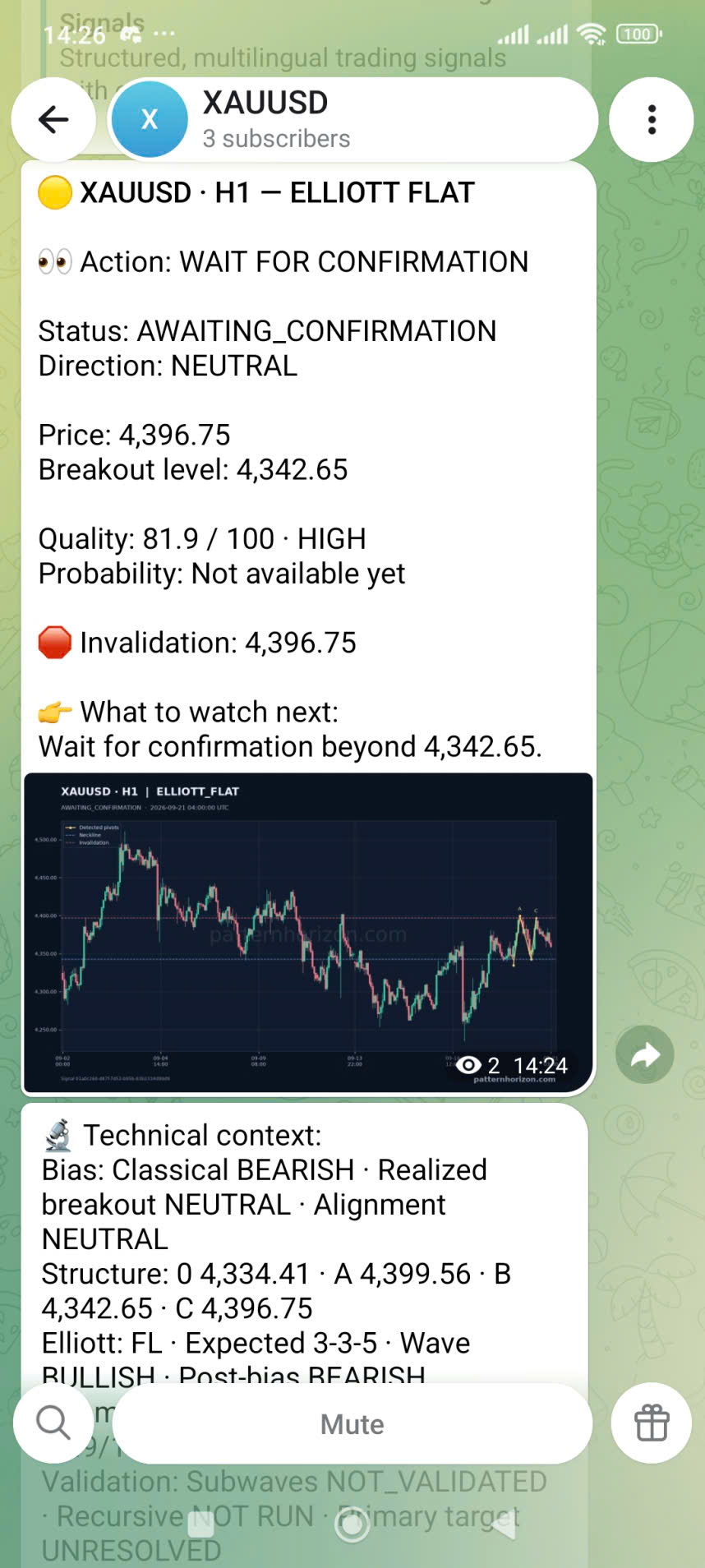
The header normally follows the pattern SYMBOL · TIMEFRAME — SIGNAL TYPE. In “XAUUSD · H1 — ELLIOTT FLAT,” XAUUSD identifies the market, H1 means the structure was evaluated on one-hour data, and ELLIOTT FLAT names the detected pattern family. None of these fields should be silently substituted. A setup on H1 is not automatically the same setup on H4, and a signal for spot gold is not interchangeable with a different instrument that happens to track gold.
The signal type tells you which reading framework applies. Pattern signals may reference structures such as Elliott Flat, Elliott Zigzag, Elliott Double Three, Elliott Expanding Triangle, or other supported formations. Zone signals may describe support, resistance, a swing top or bottom, or a support/resistance conflict. Pattern messages emphasize formation structure, a confirmation boundary, target logic, and invalidation. Zone messages emphasize a price range and the way price interacts with it.
The colored icon at the beginning is a quick visual cue, not a substitute for the written fields. Read the full header every time, especially when several symbol channels are active. A notification arriving in a symbol-specific channel reduces sorting effort, but it does not remove the need to verify the symbol and timeframe.
The action layer
Action is the platform’s plain-language summary of what the current state calls for observing. WATCH means a relevant setup exists but has not reached a stronger decision point. WAIT FOR REACTION is common around a zone where the market still needs to show rejection or a confirmed break. WAIT FOR CONFIRMATION means the structure has not satisfied its configured confirmation condition. SETUP CONFIRMED reports that the defined confirmation has occurred. WAIT / NO CLEAR EDGE highlights conflict or ambiguity. SETUP INVALIDATED closes the previous setup. TARGET REACHED records that the primary target event occurred.
Status is the machine-readable lifecycle state behind that summary. Examples include FORMING, AWAITING_CONFIRMATION, CONFIRMED, TOUCHING, IN_ZONE, REJECTED, BROKEN, TARGET_REACHED, and FAILED. Direction is a different field: BULLISH, BEARISH, NEUTRAL, or UNCLEAR describes the orientation currently assigned to the setup. AWAITING_CONFIRMATION with NEUTRAL is not contradictory; it says a structure is being monitored without an established directional edge. Likewise, TARGET_REACHED with BULLISH or BEARISH describes a completed milestone, not a new entry instruction.
Use Action for the first behavioral cue, Status to locate the setup in its lifecycle, and Direction to understand orientation. If the three seem surprising together, open the full analysis rather than forcing the message into a simple buy/sell interpretation.
Review current signalsMarket references
Price is the market reference captured for the signal event. It helps you compare the notification with current conditions, but it is not a guaranteed executable price. If the market has moved materially by the time you read the message, the relationship among price, target, invalidation, and key level may also have changed.
A Breakout level is the boundary used by that pattern’s confirmation or breakout logic. The wording “wait for confirmation beyond 4,342.65,” for example, means the system is monitoring evidence beyond that configured level. It does not say that any brief tick through the number is automatically sufficient in every strategy. The signal’s own status tells you whether Pattern Horizon has recorded the required transition.
Zone signals display Support or Resistance as a range rather than a single price because market reactions often occur across an area. If current price is inside or touching the range, focus on the status and the next-step text. When support and resistance overlap or disagree across timeframes, Direction may become UNCLEAR and Action may become WAIT / NO CLEAR EDGE. That is useful information: the system is explicitly declining to manufacture certainty from conflicting structure.
Numbers retain the precision appropriate to each instrument. Do not compare the number of decimal places across XAUUSD, EURUSD, an index, and a cryptocurrency as though precision itself expressed confidence.
Assessment, not a promise
Quality summarizes characteristics of the detected structure under the system’s rules. Pattern messages may show a score out of 100 with a label such as HIGH, MEDIUM, or LOW. Zone messages may display a Zone score. A high quality value means the detection fits its structural criteria relatively well; it does not mean the setup has the same percentage chance of producing profit. Quality is not a historical win rate, a recommendation strength, or a guarantee that price will reach the target.
Probability is lifecycle-aware. While a pattern is FORMING, CANDIDATE, or AWAITING_CONFIRMATION, the relevant value may be formation probability. After confirmation or a recorded break, the platform may select a directional probability that corresponds to the realized direction. In later states, a confidence value may be used when available. If the message says “Probability: Not available yet,” the correct interpretation is that the applicable probability has not been supplied for that state—not that the probability is zero and not that success is certain.
Never combine Quality and Probability by intuition, such as treating 90/100 quality plus a target percentage as a 90% trade. They come from different fields and describe different aspects of the setup. Use them as supporting evidence after you understand Action, Status, Direction, and the market levels.
Outcome boundaries
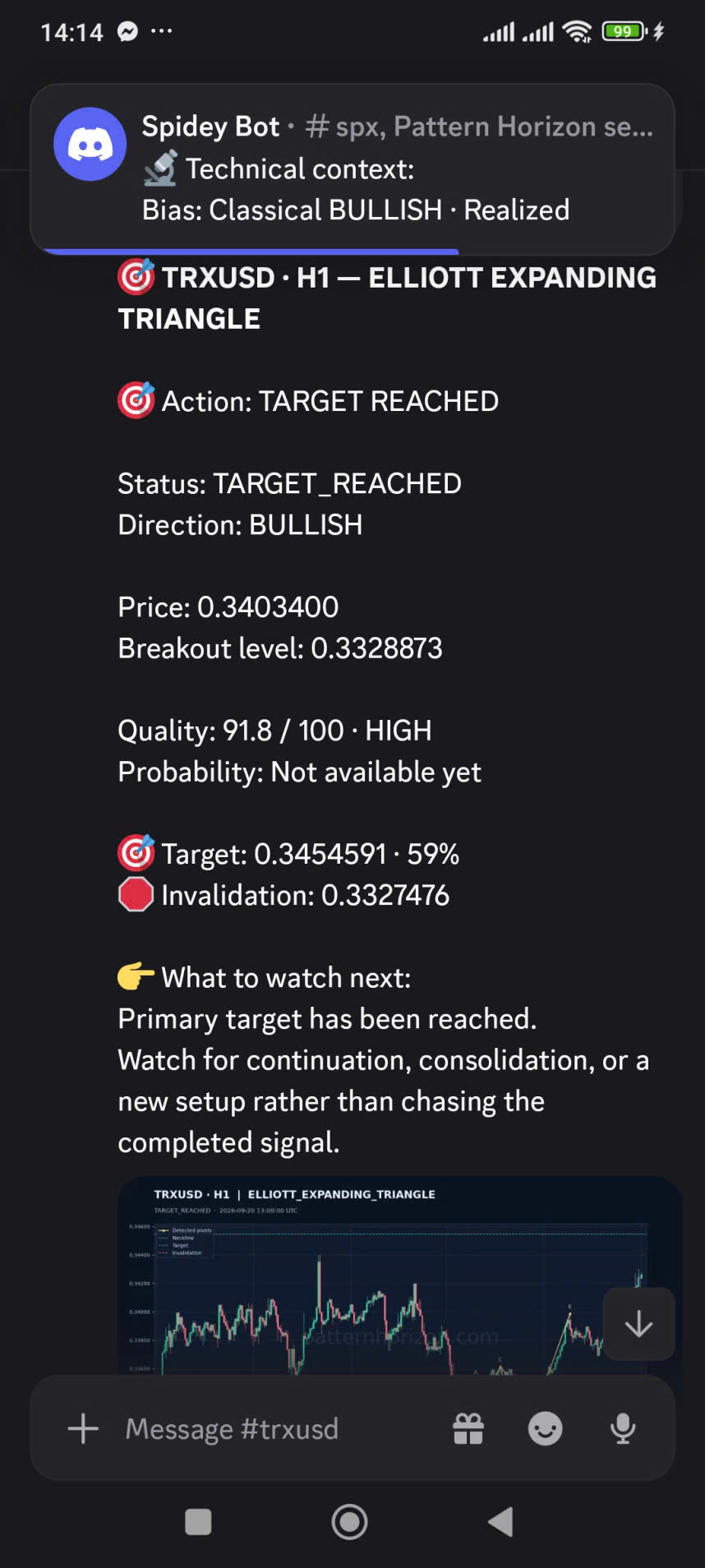
Target is the primary price objective associated with the pattern logic. Some messages also show a target probability. TARGET_REACHED means the recorded market movement reached that primary objective according to the system. The accompanying guidance correctly warns against chasing the completed signal: after a target event, continuation, consolidation, or a completely new setup may follow.
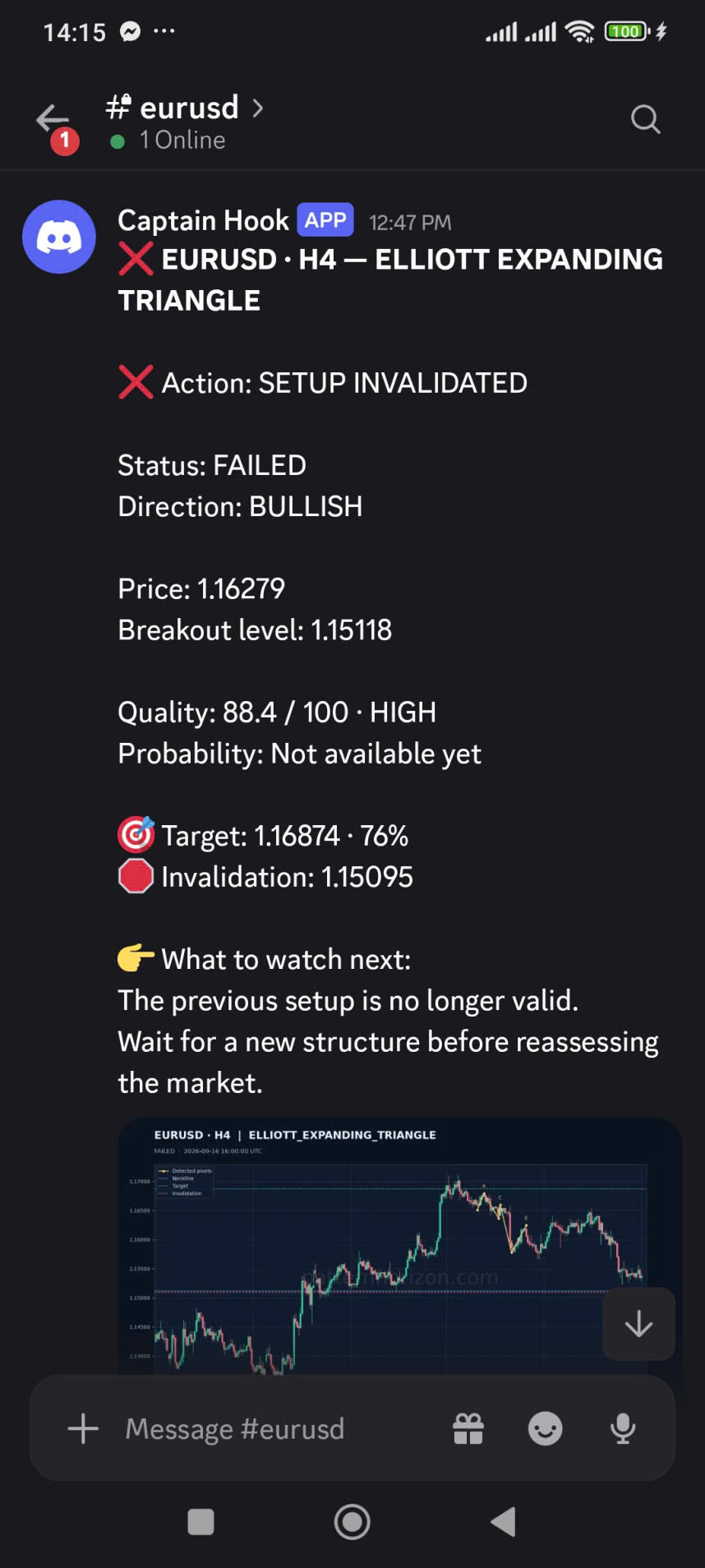
Invalidation is the level or condition at which the current interpretation no longer remains valid under the model. It is essential context because it defines where the setup’s logic breaks. However, it is not automatically an appropriate stop-loss for every account. The distance to invalidation, instrument volatility, execution costs, slippage, and position size still need independent assessment.
A FAILED or SETUP INVALIDATED message is not a reverse trade signal. It says the previous setup is no longer valid and instructs the reader to wait for new structure before reassessing. This distinction protects against a common mistake: immediately switching direction simply because one thesis failed. Failure closes an old hypothesis; it does not, by itself, confirm the opposite one.
Open the signal feedA 60-second review
A fixed sequence reduces the chance that an attractive target or a HIGH label captures your attention before you understand the setup.
Confirm that you are looking at the intended market and analytical horizon, then compare the event time and displayed price with current conditions.
WATCH, WAIT, CONFIRMED, INVALIDATED, and TARGET REACHED imply different stages. Do not let a target or quality score override the action summary.
Ask both where the setup is in its lifecycle and whether its orientation is bullish, bearish, neutral, or unclear.
Read the breakout boundary or support/resistance range and determine whether price is approaching, interacting, or already beyond it.
Treat structural quality, any available probability, and lifecycle results as distinct measurements rather than one confidence score.
Use the next-step text as a monitoring checklist, then follow the full-analysis link for technical context and event history before making your own decision.
Delivery details
A Telegram channel may display the text, chart, and technical context as consecutive messages, while Discord may present the same material in a channel with a full-analysis link. Mobile screens can hide the lower part of a long message, so scroll before assuming a field is missing. A chart thumbnail is supporting context; zooming or opening the website is safer than trying to infer exact levels from a small image.
Notifications are distributed according to account entitlements and enabled symbol delivery. They can arrive after the platform processes a detection and records a meaningful event. “Realtime” therefore means prompt post-processing distribution, not zero latency. Messaging-provider delay, network conditions, scheduled detection, and market-feed timing can affect when a message becomes visible.
Use the full-analysis link when it is present. It connects the notification to the protected Pattern Horizon view for that signal event, where entitled users can inspect structured fields and history. Do not share protected links or assume that a screenshot contains every later update. The newest website state is the better reference when messages appear out of order or when you return to a setup after time has passed.
Important information
Pattern Horizon provides market information and educational content. Its notifications are not personalized investment, financial, legal, or tax advice; they do not guarantee a result and do not execute trades. Markets can move before or after a notification, patterns can fail, and losses can exceed the amount initially expected in volatile or leveraged conditions.
Before acting, verify current price, understand the instrument, consider liquidity and execution costs, define your own risk, and assess whether the setup is compatible with your method and circumstances. The most valuable reading habit is not finding a field that promises certainty. It is using all fields together to identify what the system observed, what has changed, what remains unconfirmed, and what would invalidate the current interpretation.